A Failed Binance Web3 Wallet Swap Still Costs You the Network Fee
When a swap in Binance Web3 Wallet fails, you still pay the network fee, and you don't get it back. That rule is set out in What Is Binance Wallet Swap?, Binance's help-centre article on wallet swaps. The coins you tried to swap don't vanish with the failed transaction; you can still withdraw them afterwards.
On cancelling, the same page has one line: "All swaps are final after confirmation." After you tap [Confirm] and pass the passkey or two-factor check, the swap can't be undone. So the way to avoid paying fees for nothing is to get everything right before that point: choose the correct network, read the quote, set a slippage tolerance you can live with, and keep enough of the fee token in the wallet.
Why Binance Wallet swaps fail
Binance's FAQ names three reasons a swap can fail, under the words "including but not limited to":
- An error in the conversion mechanism
- Insufficient liquidity
- A token Binance Wallet doesn't support
The first two sometimes show up at the quote stage. When the conversion mechanism errors out or liquidity is thin, a notice may appear first; if it does, wait for the system to refresh, and it will shortly recommend a different provider. There's no need to keep tapping. Once the new provider and quote appear, check the rate and [Minimum Received] again before going any further.
The third case is different. If the token itself isn't supported, waiting for another provider or raising slippage is unlikely to change the outcome, and every failed retry costs another network fee. Stop there rather than resubmitting again and again to get one particular token.
An expired quote is another way to get stuck, and it isn't on the list above. The confirmation page has to be confirmed within a set time. Once that time is up the quote lapses, and tapping [Refresh] fetches a new one. The new quote's rate and [Minimum Received] may not match the last one, so go over both numbers again before you confirm.
What happens to your coins and the network fee after a failed swap
After a failed swap, the funds sent out from your Binance Wallet remain in your Binance Wallet account, and you can withdraw them as usual. If you can't find them straight away, it's worth looking in both places: your wallet assets and your exchange account.
Should you want the coins out of the wallet altogether, you can move them back to the exchange. That transfer carries a network fee too.
The network fee on the failed attempt is a different matter. In the FAQ's words, "if a swap fails, you still have to pay the network fee. It won’t be refunded." The money goes to the blockchain network. Binance has a separate article on network fees: the fee is paid to the validators who process transactions and keep the network secure, and no part of it goes to Binance. The network sets the amount, and it moves with demand: when many transactions are submitted at the same time, fees can rise. Binance Wallet works the fee out automatically from network conditions at that moment.
Sometimes there's a fee before the swap as well. You may be asked to authorise a third-party application or smart contract to access the funds in your Binance Wallet, which you do by entering the swap details and tapping [Approve]. The approval costs a network fee of its own, shown on the approval page. That makes two points at which a network fee is charged: authorising third-party access to your funds, and the swap itself.
Keep in mind who is being authorised: a third party. Swap liquidity comes from third-party dApps, and "Binance does not hold responsibility for any risks or potential damage incurred from the use of third-party dApps associated with Binance Wallet." Be more careful with any approval request that appears outside the swap page, especially a pop-up from a site you don't know. Before you act on one, it helps to know the ways an approval gets used to move assets out of a wallet.
Where to set slippage tolerance in Binance Wallet, and whether to raise or lower it
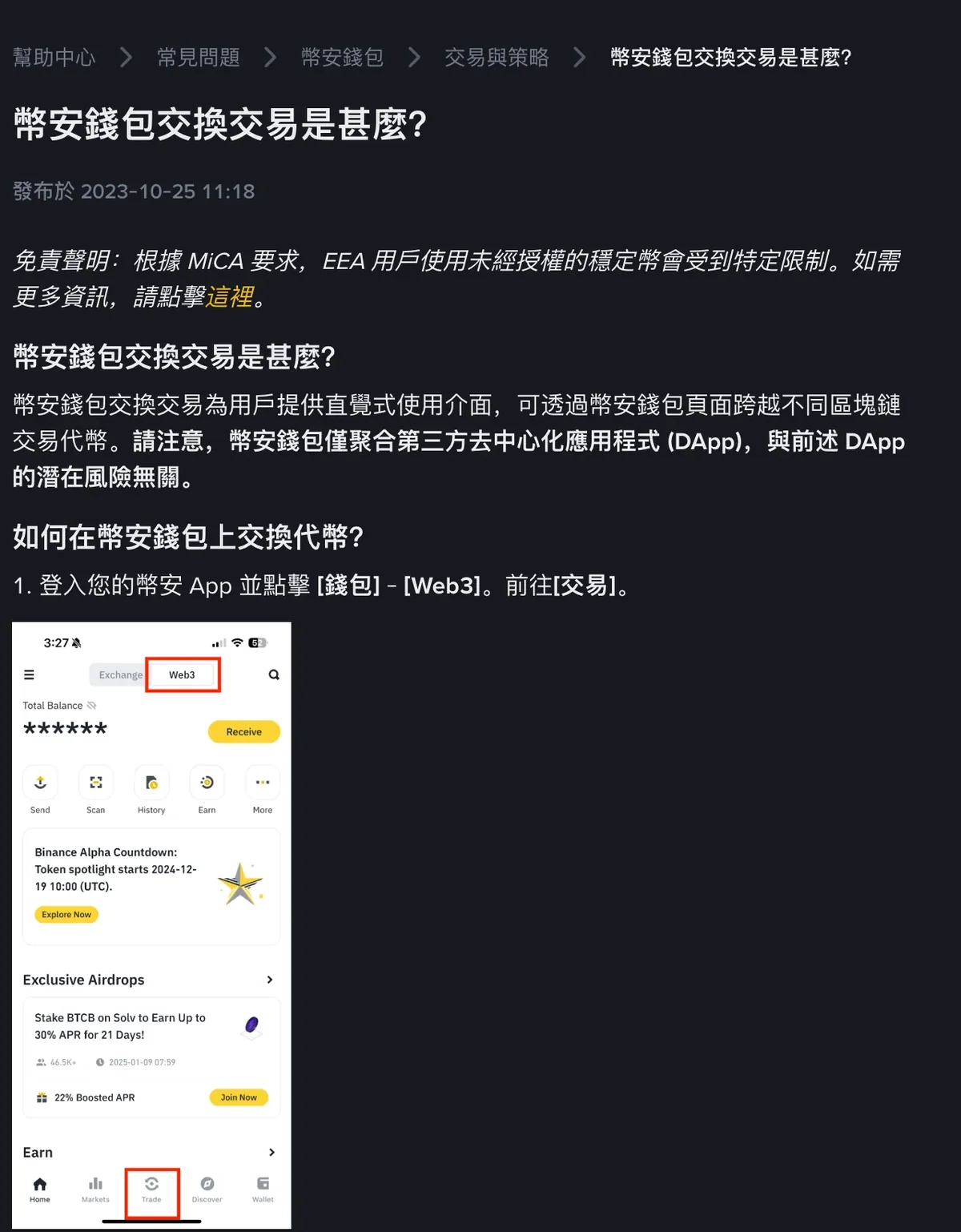
Swaps start in the Binance app: tap [Wallets] - [Web3], go to [Trade], and pick the tokens and the network on the [Swap] tab. The wallet supports cross-chain swaps, and the example Binance gives is swapping BNB on BNB Smart Chain for USDT on Ethereum. The [Bridge] function is an alternative. Swaps require a verified Binance account. If you haven't opened and backed up a Web3 Wallet yet, that comes first.
After you enter an amount, the page lists the rate, the provider, slippage, the network fee and the TX fee. Before confirming you can also see the estimated swap time and the withdrawal fee. To set slippage:
- Tap the edit icon next to [Minimum Received].
- Enter the slippage tolerance you want.
- Tap [Save].
Slippage is the gap between the price you expect or request and the price at which the trade is actually executed. It usually shows up in volatile or low-liquidity markets.
On whether to go higher or lower, Binance describes the trade-off like this: a higher slippage tolerance makes the trade more likely to succeed, but "it might lower the minimum amount you can receive".
In practice, look back at the [Minimum Received] line every time you change the tolerance. That figure is the smallest amount you agree to accept from this swap. If it drops below what you can accept, set the tolerance back and leave this swap for now. In the opposite case, where you would accept less than the minimum currently shown and the swap keeps failing, raise the tolerance a little at a time and check that figure after each change.
The rate shown on the quote is an estimate, and the final rate may differ. Once the swap has gone through, the actual rate is in your swap history.
How to swap when you don't have enough BNB for the network fee
Each chain charges its fee in its own token: BNB on BNB Smart Chain, ETH on Ethereum, TRX on TRON. Binance's network-fee article says a transaction won't be sent when you're short of the gas token, and lists these ways to fix it:
| Option | Chains it works on | What you need first |
|---|---|---|
| Pay directly with USDT in the wallet | BNB Smart Chain, Ethereum, Solana, TRON | USDT in the wallet |
| Pay with funds in your exchange account | BNB Smart Chain, Ethereum, Solana, TRON | BNB, USDT, USDC, ETH or SOL in your Spot, Funding or Earn account on the exchange; choose to pay from the exchange account when you pay |
| Transfer gas tokens over from the Binance exchange | — | Buy a gas token such as BNB, ETH or SOL on the exchange first, then tap [Receive] on the wallet's [Assets] page and choose [Withdraw from Binance Exchange]; check the address and network before you withdraw |
| Pay with BNB in your Spot or Funding account | BNB Smart Chain, Ethereum, opBNB | More than 0.01 BNB in either the Spot or the Funding account; when signing the transaction, select Binance Spot & Funding Account as the gas fee account |
| Transfer in from another wallet | — | Gas tokens at another address; check the token symbol, address and network before you send |
| Buy with a credit or debit card | — | VISA or Mastercard; check the token symbol, address and network before you buy |
With no USDT in the wallet and none of those coins in your exchange account, the first two options are out. You'll have to buy or transfer in a gas token (or USDT) before the transaction can complete. Pick the right network when you transfer in. If you do pick the wrong one, whether a transfer sent on the wrong chain can be recovered depends on the circumstances. Separately, if you have manually set a very high network fee, the article's suggestion is to try lowering it.
Can a Binance Web3 Wallet swap be hit by an MEV sandwich attack?
A sandwich attack is one kind of MEV (maximal extractable value) attack. The BNB Chain blog explains it this way: malicious bots place one transaction before and one after the swap order you send to a decentralised exchange, manipulating the asset's price so that you get a worse execution price and take a loss.
That 2025 post introduces MEV protection options on BNB Smart Chain. It lists Binance Wallet among the wallets with built-in MEV protection, and says Binance Web3 Wallet has MEV protection enabled by default, with no extra setup needed. This is BNB Chain's account, and it concerns transactions on BNB Smart Chain (BSC).
Even with that protection on, slippage tolerance and [Minimum Received] are still yours to check. Swaps on Ethereum or other chains, and cross-chain swaps, aren't discussed in the BNB Chain post at all. Before you confirm, check [Minimum Received] the way the slippage section above describes, then send.